 Fundamentals Hub
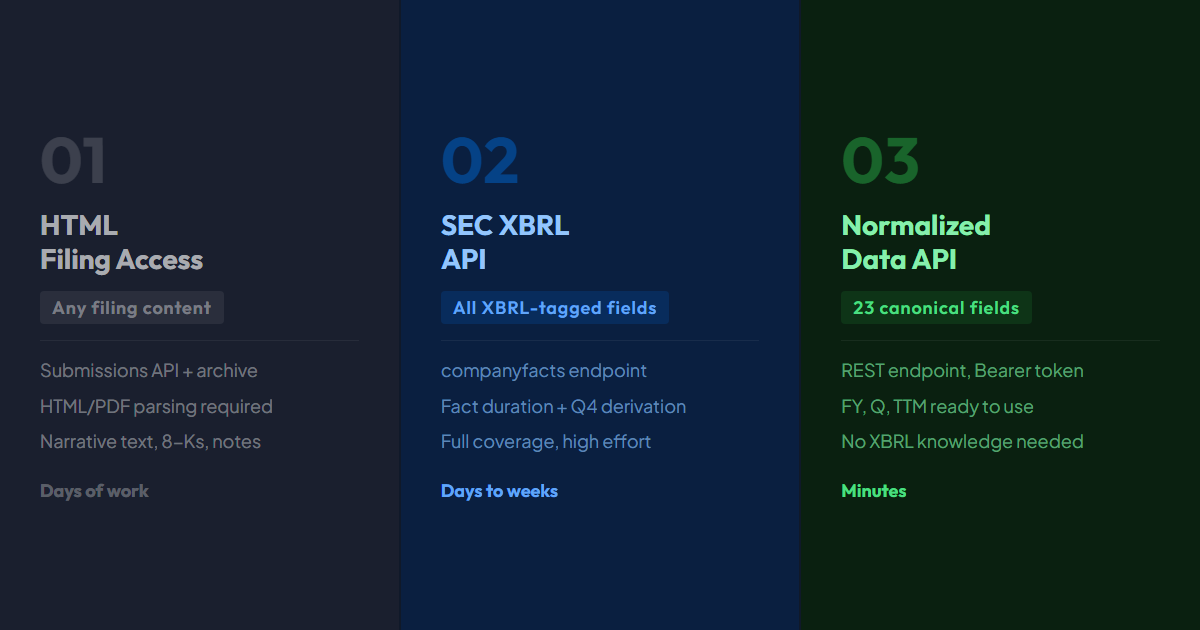
What is the fastest path from a 10-K filing to a usable revenue number? The answer depends entirely on what you are building, and three real methods exist for how to get SEC filing data, each with a distinct trade-off between setup time, flexibility, and data quality.
This post covers all three: direct HTML filing access, the SEC XBRL structured data API, and a normalized financial data API. Code examples are in Python. Background on why XBRL parsing is difficult lives in the XBRL data explainer. For Python workflow details beyond what's here, the financial data Python tutorial picks up from the API integration step.
What "SEC Filing Data" Actually Covers
- SEC Filing Data
- Financial information from 10-K (annual) and 10-Q (quarterly) reports: revenue, net income, balance sheet figures, cash flow statements.
- Method 1: Raw HTML
- Download the filing document directly from EDGAR. Full content access but requires HTML parsing. Best for narrative text and non-tagged data.
- Method 2: XBRL API
- SEC's structured data API at data.sec.gov. Machine-readable financial facts, but requires tag mapping, per-field duration checks, cumulative-flow subtraction, and Q4 derivation.
- Method 3: Normalized API
- A third-party API built on SEC EDGAR that resolves tag inconsistency and returns consistent canonical fields.
Before choosing a method, narrow down what you need. This post covers structured financial data from 10-K (annual) and 10-Q (quarterly) filings - revenue, net income, balance sheet figures, cash flow. That is the territory most developers mean when they talk about pulling SEC data.
If you need something different, the method changes:
- Narrative text (MD&A, risk factors, earnings commentary) - Method 1 is the only path
- Event-driven data from 8-K filings (material events, earnings dates) - Method 1 applies
- Insider transaction records on Forms 3, 4, and 5 (initial holdings, transactions, and annual statements respectively) - the EDGAR full-text search API handles this
- Ownership disclosures from 13-F and 13-G filings - separate parsing challenge
For financial statements specifically, Methods 2 and 3 are purpose-built.
Method 1: Raw HTML Filing Access
Every EDGAR filing is publicly available as an HTML document. Method 1 retrieves the filing index, locates the primary document, and downloads the HTML. For a narrower walkthrough of filings.recent, accessionNumber, and primaryDocument, see the data.sec.gov/submissions JSON guide.
Step 1 - Find the filing via the submissions API:
import requests

headers = {"User-Agent": "YourApp your@email.com"}  # Required
cik_padded = "0000320193"  # Apple

submissions = requests.get(
    f"https://data.sec.gov/submissions/CIK{cik_padded}.json",
    headers=headers
).json()

filings = submissions["filings"]["recent"]
ten_k_idx = next(i for i, f in enumerate(filings["form"]) if f == "10-K")
accession_raw = filings["accessionNumber"][ten_k_idx]
accession_folder = accession_raw.replace("-", "")
cik = int(cik_padded)  # 320193 (no leading zeros for archive path)
Step 2 - Navigate to the filing document:
import time

# SEC caps requests at 10/sec; sleep keeps us under it
time.sleep(0.1)

index_url = (
    f"https://www.sec.gov/Archives/edgar/data/"
    f"{cik}/{accession_folder}/{accession_raw}-index.json"
)
index = requests.get(index_url, headers=headers).json()

# Prefer the SEC `type` field; fall back to filename matching for older filings
primary_doc = next(
    (item["name"] for item in index["directory"]["item"]
     if item.get("type") == "10-K" and item["name"].endswith(".htm")),
    next(
        item["name"] for item in index["directory"]["item"]
        if item["name"].endswith(".htm") and "10-k" in item["name"].lower()
    ),
)
filing_url = (
    f"https://www.sec.gov/Archives/edgar/data/"
    f"{cik}/{accession_folder}/{primary_doc}"
)
time.sleep(0.1)  # stay under SEC's 10 req/sec cap
html_content = requests.get(filing_url, headers=headers).text
One detail most EDGAR tutorials omit: the submissions endpoint returns up to 1,000 most recent filings in the recent array. Older filings are split into separate JSON files referenced by submissions["filings"]["files"], a list of additional JSON pagination files to fetch separately.
Method 1 is the right tool when you need data that does not exist in the XBRL schema: specific text from the MD&A section, footnote disclosures, supplemental tables a company chose not to tag. It is the wrong tool for systematic financial data extraction across many companies.
Method 2: SEC XBRL API
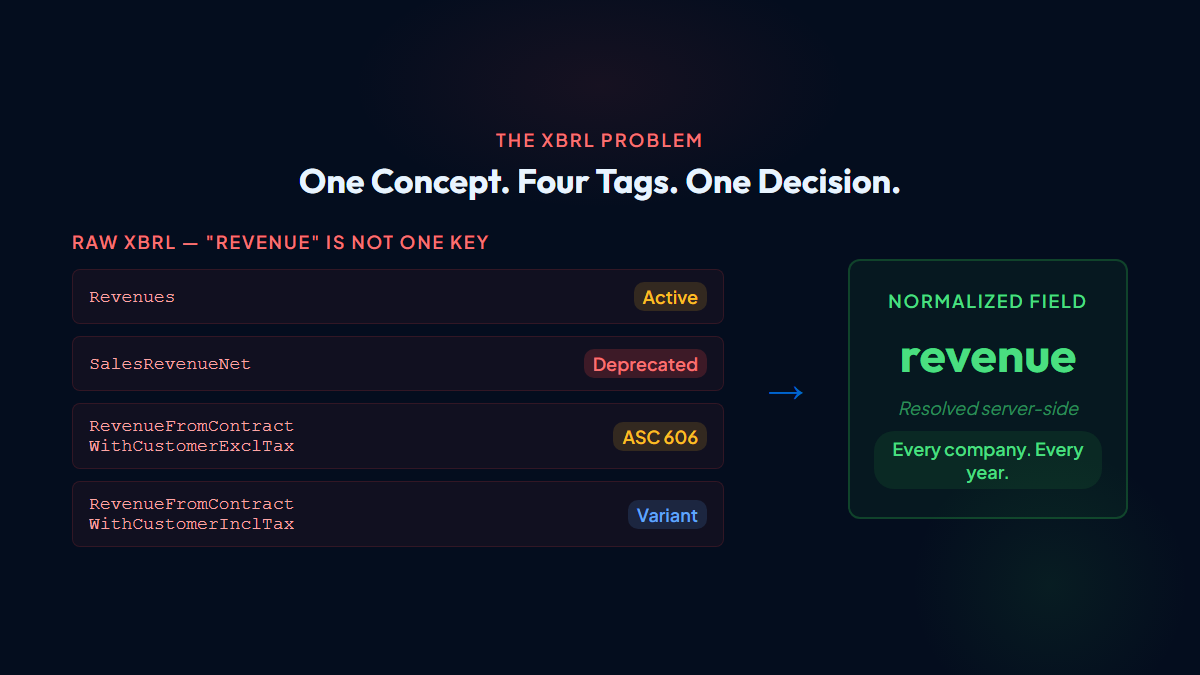
The SEC XBRL API provides financial data in machine-readable form without HTML parsing. The companyfacts endpoint returns all tagged values for a company in one JSON payload.
import requests
from datetime import date

headers = {"User-Agent": "YourApp your@email.com"}
cik_padded = "0000320193"

facts = requests.get(
    f"https://data.sec.gov/api/xbrl/companyfacts/CIK{cik_padded}.json",
    headers=headers
).json()

us_gaap = facts["facts"]["us-gaap"]

revenue_tags = [
    "Revenues",
    "SalesRevenueNet",
    "RevenueFromContractWithCustomerExcludingAssessedTax",
    "RevenueFromContractWithCustomerIncludingAssessedTax",
]

annual_by_end = {}
for tag in revenue_tags:
    usd_facts = us_gaap.get(tag, {}).get("units", {}).get("USD", [])
    for fact in usd_facts:
        start, end = fact.get("start"), fact.get("end")
        if fact.get("form") != "10-K" or not start or not end:
            continue
        days = (date.fromisoformat(end) - date.fromisoformat(start)).days
        if days not in range(300, 381):
            continue
        previous = annual_by_end.get(end)
        if previous is None or fact.get("filed", "") > previous.get("filed", ""):
            annual_by_end[end] = fact

annual = sorted(annual_by_end.values(), key=lambda x: x["end"], reverse=True)
print(annual[0])
This example selects full-year revenue across tag transitions. Production selection keeps semantic priority except for two scope proofs: (1) an exact-zero priority FY with another positive full-year revenue candidate (negative revenue is not zero); or (2) only when the nonnegative priority candidate does not reconcile, a reconciling alternative whose Q1-Q3 subtotal exceeds the priority FY. Otherwise keep priority.
The engineering cost is real: revenue alone requires checking 4+ XBRL tags. A 10-Q flow fact can cover either one quarter or the fiscal year to date. Classify each fact from its start and end dates: use quarter-duration facts as reported, and subtract the prior YTD value only for cumulative Q2 or Q3 facts. There is no Q4 10-Q, so derive additive Q4 flows as FY minus normalized Q1 through Q3. Balance sheet facts are point-in-time stocks and must not be subtracted. Apple's companyfacts JSON is roughly 3-4 MB compressed (around 15-20 MB uncompressed).
Method 2 is the right choice when you need complete tag-level access, every field from every filing, including fields outside a canonical schema. For developer use cases that just need clean financial statements, it is more complexity than the problem warrants.
(Fundamentals Hub is built on exactly this data. Tag mapping, full-year duration filtering, same-concept series reconciliation, cumulative-flow subtraction, Q4 derivation, and response caching run server-side. Each API response includes provenance data showing which XBRL tag produced each value.)
Method 3: Normalized Financial Data API
A normalized API sits on top of SEC EDGAR and exposes a consistent schema regardless of each company's XBRL tag choices:
import requests

response = requests.get(
    "https://fundamentalshub.com/api/v1/company/320193/fundamentals",
    params={"period_type": "FY"},
    headers={"Authorization": "Bearer your_api_key"}
)

for period in reversed(response.json()["data"][:3]):  # Latest 3 FYs, oldest first
    print(
        f"{period['period_end']}: "
        f"Revenue ${period['revenue'] / 1e9:.1f}B, "
        f"Net income ${period['net_income'] / 1e9:.1f}B"
    )
# 2023-09-30: Revenue $383.3B, Net income $97.0B
# 2024-09-28: Revenue $391.0B, Net income $93.7B
# 2025-09-27: Revenue $416.2B, Net income $112.0B
The field revenue is always revenue, regardless of which XBRL tag Apple used for that filing year. With period_type=Q, the API uses quarter-duration Q2/Q3 facts as reported, subtracts only cumulative facts, and derives Q4 from the annual filing because there is no Q4 10-Q. For period_type=TTM, flow fields sum four consecutive standalone quarters while stock fields use the latest quarter-end value.
The trade-off is scope. If you need a field outside the standardized schema, a specific footnote disclosure, a non-GAAP metric, or narrative text from the MD&A, Method 3 will not have it. The normalized API covers the 23 canonical financial fields documented in the SEC EDGAR API guide.
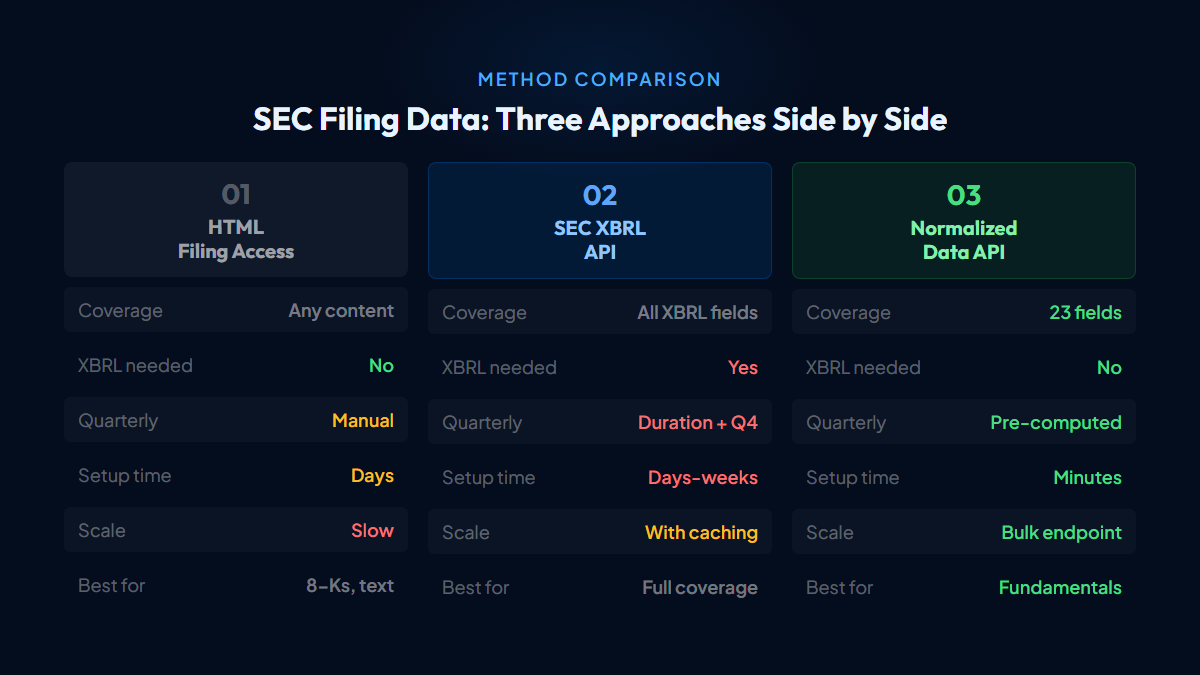
How to Get SEC Filing Data: Choosing the Right Method
| Method 1: HTML Filing | Method 2: XBRL API | Method 3: Normalized API | |
|---|---|---|---|
| Data coverage | Any content in the filing | All XBRL-tagged fields | 23 canonical financial fields |
| Requires XBRL knowledge | No | Yes | No |
| Quarterly standalone | Manual extraction | Check duration; derive Q4 | Pre-computed |
| Authentication | User-Agent header | User-Agent header | Bearer token |
| Setup time | Hours to days | Days to weeks | Minutes |
| Best for | Narrative text, 8-Ks, footnotes | Complete tag coverage, research | Clean fundamentals, analysis |
A few use cases that sharpen the decision:
"I want revenue trends for 20 tech companies in a pandas DataFrame." Use Method 3. The tag mapping is resolved, the quarterly figures are standalone, and you can have data in under an hour. See the financial data Python tutorial for the pandas integration pattern.
"I need every XBRL-tagged value from every 10-K, including non-standard disclosures." Use Method 2. Accept the engineering cost in exchange for complete coverage.
"I need the exact text of a company's cybersecurity risk disclosure." Use Method 1. That text is not tagged in XBRL.
Developers working with financial statements tend to start with Method 3 and reach for Method 1 only when they need content outside the standardized field set.
Fundamentals Hub covers 8,000+ US public companies, income statement, balance sheet, and cash flow in clean JSON. You can try the free tier here.